In my previous post on this topic, I briefly evaluated a number of options that self-publishers use to format a book. In this post, I will describe how I used Latex and a few other open-source tools to format An Explanation of the Book of Judith.
As previously mentioned, I used Google Docs as my word processor. I did this because I wanted to make the document open to collaboration. You can still read the entire book in the original Google document. Getting the book into Latex format required the use of Pandoc, which is a very powerful document conversion tool. The conversion was not perfect and I also wanted to break it up into separate files for each chapter, so I wrote a Python script along with TexSoup to break it up and make a few systematic changes to the document. For instance, I automatically inserted non-breaking spaces between the names of Bible books and chapter numbers so that Bible references wouldn’t be broken up across separate lines. I continued using Google Docs as the authoritative document, repeatedly exporting the DOCX and running the various steps on the export using a Makefile.
Getting the Latex document formatted to my liking was a fairly arduous process. Latex is fairly arcane, so if you are not a software engineer or mathematician, you are likely to run away screaming in terror once you catch a glimpse of it. However, it is a long-standing standard for creating papers and other publications in certain areas of the academic world. I used it back in the early ’90s to write a thesis. The key to using Latex well is separating formatting from the content itself. For instance, rather than making scripture excerpts bold, I created a macro called bibleverse to demarcate those portions from the rest of the text. In that macro, I set the text to be bold. However, if I wanted to change the style to use italic text for the scripture excerpts, I would simply change the macro and the entire document would change. Below is example code from the beginning of chapter 2.
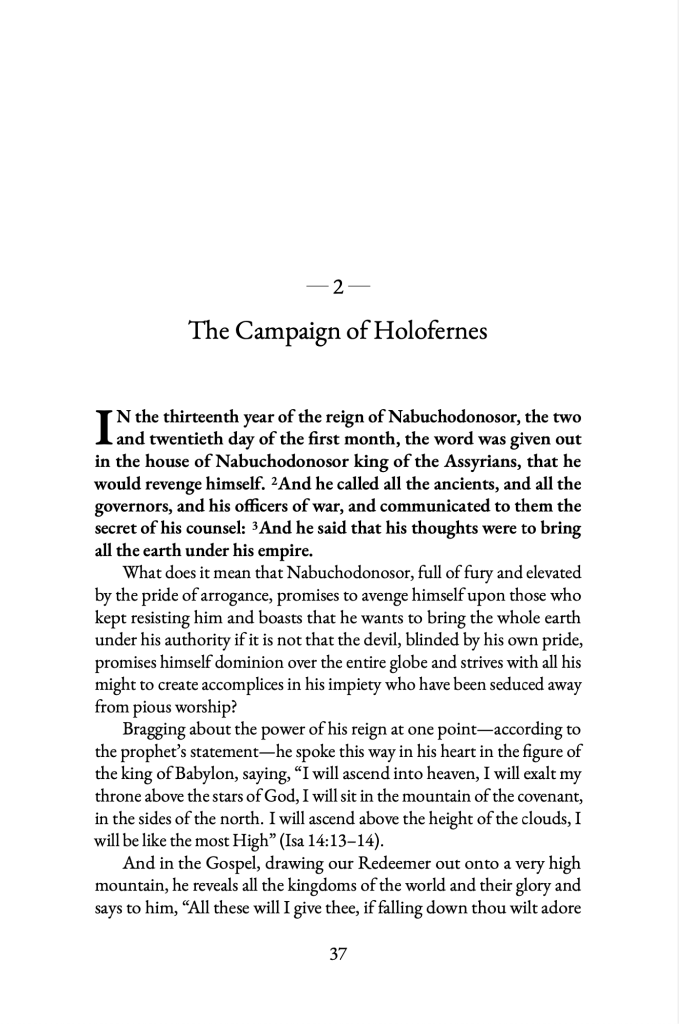
The above code produces the page on the right.
By the end of my book formatting process, I had developed a complete Latex style. And wouldn’t you know it, that style has turned out to be handy for my next project (which I will introduce later). Because this worked out so well, I’ve decided to skip Google Docs altogether and use Latex directly for this new project. I no longer have to worry about how to format the next commentary. I simply type in the content and run Latex on it.
For the book cover, I used a combination of Gimp and Scribus. Scribus is a little awkward on a Mac but is the best option if you are looking to keep your costs low. It was sufficient since I only used it for the book cover. I’ve used Gimp on and off for many years, so I was able to put something together fairly quickly for the front, learning just enough about Scribus to lay out the whole spread and typeset the blurb on the back cover and the spine.




 parochianus